
Ma reggel az ADA P1 Meter ébresztett és lefőzte a kávémat is :)
Októberben megjelenik az új funkció a HMKE.APP-ban! Az ADA P1 Meter most már nem csak olvas, vezérel is. A hmke.app felületen konfigurálod a szabályokat, az eszköz pedig helyben, saját memóriából futtatja őket – akkor is, ha épp nincs net a lakásban. Ebben a cikkben részletesen bemutatjuk a vezérlés felépítését, a szabályok (“rules”) formátumát, az interpreter képességeit és a gyakorlati mintákat.
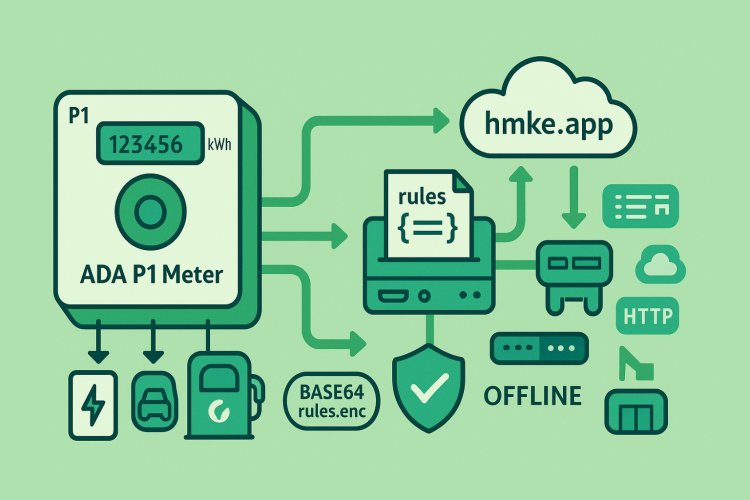
Összefoglaló – hogyan épül fel?
1. Konfiguráció a hmke.app-ban → a szabályok egy JSON fájlba kerülnek.
2. A JSON-t a rendszer Base64-re kódolva küldi az eszköznek (MQTT-n vagy HTTP-n).
3. Az ADA P1 a szabályokat /rules.enc néven LittleFS-ben tárolja, és RAM-ba is betölti.
4. Az interpreter az aktuális mérőadatokból és kiegészítő értékekből (plugins) feltételeket értékel és HTTP hívásokat hajt végre.
5. A szabályok offline is futnak, amint jön egy teljes DSMR telegram.
Kulcsüzenet: A vezérlés nem felhős függésű. A hmke.app csak a kényelmes szerkesztő/terítő; a végrehajtás mindig lokálisan, az ADA P1-en történik.
Adatfolyam és komponensek
· DSMR → JSON: a mérő üzeneteiből az ADA P1 egy részletes JSON-t állít elő (pl. feszültség, áram, teljesítmény, tarifa, időbélyeg, …).
· Plugins: bármilyen saját szenzor/érték írható az ADA P1-be a POST /write végponton (→ a JSON-ban plugins..value).
· Interpreter: a szabályok condition kifejezéseit kiértékeli, és a hozzájuk tartozó actions listát végrehajtja (HTTP GET/POST).
· Állapotkezelés: minden szabálynak külön állapota van (időzítő, lefutott-e már, cooldown, stb.).
A szabályok formátuma
A szabályok egyetlen JSON-ban utaznak:
{ "rules": [ { "id": "coffee_on_0730", "enabled": true, "condition": "voltage_phase_l1 > 220 && time_hm == 730", "min_timer_seconds": 0, "repeat": true, "repeat_delay_seconds": 120, "actions": [ { "method": "GET", "url": "http://192.168.31.185/relay/0?turn=on" } ] } ]}
Mezők
· id (string, kötelező): egyedi azonosító.
· enabled (bool, alapértelmezés: true): szabály ki-/bekapcsolása.
· condition (string, kötelező): kiértékelendő kifejezés (lásd Interpreter szintaxis).
· min_timer_seconds (int, default: 0): ennyi ideig folyamatosan igaznak kell lennie a feltételnek, mielőtt futnak az akciók.
· repeat (bool, default: false): ha igaz, a szabály ismételhető.
· repeat_delay_seconds (int, default: 0): ismétlés cooldown ideje – ennyi időn belül nem fut újra.
· actions (lista): HTTP hívások sora, mezők: method (GET/POST), url, opcionális body (POST-nál).
Egyszeri szabály: ha repeat: false, sikeres futás után a szabály lezár (completed) és többé nem aktiválódik.
Interpreter – szintaxis és képességek
Az interpreter az ``-ben található. Főbb tudnivalók:
Típuskezelés
· Bármilyen JSON-értéket számmá alakít (getNumericValue):
o true → 1, false → 0
o “true”/“false” stringek → 1/0
o egyéb stringek → toDouble()
Operátorok és precedencia
· Logikai: ||, &&
· Relációs: >=, <=, ==, !=, >, <
· Aritmetika: +, -, *, /
· Zárójelek támogatottak: ( … )
· Unary mínusz a kifejezés elején kezelt.
A feldolgozó a kifejezést rekurzívan bontja, így a megszokott matematikai precedencia érvényesül (szorzás/osztás belül marad az összeadás/kivonás előtt).
Beágyazott (nested) kulcsok
· Használhatsz pontozott elérést: pl. plugins.pv_kw.value vagy some.nested.key.
· Ha a lánc bármely eleme hiányzik, az érték 0-nak számít.
Elérhető változók (részlet)
Az ADA P1 az alábbiakat biztosítja többek közt (a DSMR-ből és számított mezőkből):
· Idő/állapot: timestamp, time_hm (“HHMM” → számként pl. 0730 → 730), rules_global_enabled
· Feszültség: voltage_phase_l1, voltage_phase_l2, voltage_phase_l3 (V)
· Áram: current_phase_l1, current_phase_l2, current_phase_l3 (A)
· Teljesítmény: instantaneous_power_import, instantaneous_power_export (kW)
· Frekvencia / PF: frequency, power_factor, power_factor_l1/l2/l3
· Tarifa: current_tariff
· Energiamérők: active_*_energy_* stb.
· Plugins: bármely, POST /write-tel betöltött kulcs: plugins..value
TIPP: Időablakhoz használj numerikus összehasonlítást, pl. time_hm >= 700 && time_hm < 830.
Végrehajtás és állapotgép
Minden szabályhoz az eszköz állapotot tart:
· Timer: ha min_timer_seconds > 0, csak akkor futnak az akciók, ha a feltétel folyamatosan ennyi ideig igaz volt.
· Repeat: ha repeat: true, a sikeres futás után a szabály cooldown-ba megy repeat_delay_seconds ideig.
· Egyszeri futás: ha repeat: false, első sikeres futás után lezár.
· Resetelés: ha a feltétel hamissá válik, a futó timer lenullázódik; ismétlődő szabálynál a következő igaz állapotkor újra indulhat.
A végrehajtás HTTP hívásokat indít (3 s timeout). A Watchdog minden szabálynál resetet kap, így a rendszer hosszútávon stabilan fut.
Tartós tárolás és frissítés
· A szabályok a fájlrendszerben: `` (Base64-elve).
· RAM-ba betöltés induláskor és feltöltés után.
Frissítés HTTP-n
· Feltöltés: POST /rules body: { "rules_base64": "…" } → fájlba ment, RAM-ba tölt.
· Lekérdezés: GET /rules
· Törlés: DELETE /rules
· Globális engedélyezés:
o GET /rules/enable / GET /rules/disable
o GET/POST /rules/global body: { "enabled": true|false }
Frissítés MQTT-n
· Kapcsolódás: az eszköz a ada/cmd/_ csatornára iratkozik fel (QoS1).
· Szabály betöltés: küldj egy JSON-t m: "RULES" és rules_base64 mezővel. Az eszköz fájlba menti és betölti.
· Globális start/stop parancsok: az ACK csatornán (ada/ack/_) a következő üzeneteket figyeli:
o { "cmd": "ALL_START" } → globális engedély ON + minden min_timer újraindul.
o { "cmd": "ALL_STOP" } → globális engedély OFF.
· Rules dump kérés: { "cmd": "RULES_GET" } → az eszköz Base64-ben, darabolva (≈3000B) visszaküldi a szabályokat az ACK csatornára.
Megjegyzés: a topicKey = _ biztonságosítva van (“+/#/” cseréje), így jól használható témakulcs.
Helyi végpontok (HTTP)
· GET /json → a legfrissebb összeállított JSON (mérő + plugins + meta)
· GET /telegram → nyers DSMR telegram
· GET /acklog → utolsó ACK bejegyzések (MQTT)
· GET /rules | POST /rules | DELETE /rules → szabályok kezelése (Base64)
· GET /rules/enable | GET /rules/disable | GET/POST /rules/global → globális engedély
· POST /write → plugins értékek írása (→ plugins..value)
· GET /check_version → aktuális firmware verzió lekérdezése
· GET /restart | GET /factoryreset → újraindítás / gyári visszaállítás
``** példa:**
POST /write{ "device": "MyGateway", "values": { "pv_kw": 3.25, "coffee": "ready" }}
→ a JSON-ban így éred el: plugins.pv_kw.value, plugins.coffee.value
Gyakorlati minták
1) Időzített kávéfőző (csak ha van hálózati feszültség)
{ "id": "coffee_on_0730", "enabled": true, "condition": "voltage_phase_l1 > 220 && time_hm == 730", "min_timer_seconds": 0, "repeat": true, "repeat_delay_seconds": 120, "actions": [ { "method": "GET", "url": "http://192.168.31.185/relay/0?turn=on" } ]}
2) Túltermelés esetén fogyasztó bekapcsolása
{ "id": "dump_load_on_export", "enabled": true, "condition": "instantaneous_power_export > 0.2", "min_timer_seconds": 15, "repeat": true, "repeat_delay_seconds": 60, "actions": [ { "method": "GET", "url": "http://192.168.31.120/relay/0?turn=on" } ]}
0.2 kW feletti visszatáplálás 15 s-ig → kapcsoljon egy terhelést.
3) Olcsó tarifán töltés (példa)
{ "id": "cheap_tariff_charge", "enabled": true, "condition": "current_tariff == 2 && time_hm >= 2300 || time_hm < 600", "min_timer_seconds": 30, "repeat": true, "repeat_delay_seconds": 300, "actions": [ { "method": "POST", "url": "http://192.168.31.140/api/charge", "body": "{\"mode\":\"on\"}" } ]}
Példa: tarifa 2 + éjszakai idősávban küldj parancsot egy helyi töltőnek.
4) Feszültségesés védelem
{ "id": "undervoltage_cutoff", "enabled": true, "condition": "voltage_phase_l1 < 200 || voltage_phase_l2 < 200 || voltage_phase_l3 < 200", "min_timer_seconds": 5, "repeat": true, "repeat_delay_seconds": 30, "actions": [ { "method": "GET", "url": "http://192.168.31.185/relay/0?turn=off" } ]}
5) Plugin alapú logika (külső gateway jelzi a PV-t)
{ "id": "pv_based_boost", "enabled": true, "condition": "plugins.pv_kw.value >= 2.5", "min_timer_seconds": 60, "repeat": true, "repeat_delay_seconds": 180, "actions": [ { "method": "POST", "url": "http://192.168.31.150/heater", "body": "{\"power\":\"eco\"}" } ]}
Mintasorozat – komplett rules.json
{ "rules": [ { "id": "coffee_on_0730", "enabled": true, "condition": "voltage_phase_l1 > 220 && time_hm == 730", "min_timer_seconds": 0, "repeat": true, "repeat_delay_seconds": 120, "actions": [ { "method": "GET", "url": "http://192.168.31.185/relay/0?turn=on" } ] }, { "id": "coffee_off_0750", "enabled": true, "condition": "voltage_phase_l1 > 220 && time_hm == 750", "min_timer_seconds": 0, "repeat": true, "repeat_delay_seconds": 120, "actions": [ { "method": "GET", "url": "http://192.168.31.185/relay/0?turn=off" } ] }, { "id": "dump_load_on_export", "enabled": true, "condition": "instantaneous_power_export > 0.2", "min_timer_seconds": 15, "repeat": true, "repeat_delay_seconds": 60, "actions": [ { "method": "GET", "url": "http://192.168.31.120/relay/0?turn=on" } ] } ]}
MQTT – szabályfrissítés minta
Küldendő üzenet a ``** témára:**
{ "m": "RULES", "rules_base64": "eyJydWxlcyI6IFsgLi4uICBdIH0="}
A rules_base64 a fenti rules.json Base64-re kódolt változata.
Rules lekérése az ACK csatornán:
{ "cmd": "RULES_GET" }
→ válaszként darabolva érkezik vissza a rules_base64.
Globális start/stop (ACK):
{ "cmd": "ALL_START" }{ "cmd": "ALL_STOP" }
Biztonság és ajánlások
· A hívások helyi hálón történjenek, lehetőleg VLAN-ban/elkülönítve.
· Ha tudsz, használj tokenes vagy IP-szűrt végpontokat a vezérelt eszközökön.
· A rules.enc Base64, nem titkosítás – bizalmas URL-t/jelszót ne tárolj benne plain-textben.
Hibakeresés és eszközüzem
· /json: ellenőrizd, hogy a feltételekhez használt kulcsok milyen értéken állnak.
· /acklog: látszik minden MQTT-ACK üzenet rövid gyűjtése.
· /rules/global: gyorsan kapcsolhatod a szabálymotort.
· LED villanás: DSMR feldolgozásnál státuszjelzés.
· Watchdog: futásbiztonság – elakadáskor automata restart.
GYIK
Tényleg működik net nélkül? Igen. A szabályok a /rules.enc-ben vannak, RAM-ba betöltve; a kiértékelés és a végrehajtás helyben történik.
Milyen gyors a reakció? Minden teljes DSMR-telegram után fut a kiértékelés. Időzítővel (min_timer_seconds) elkerülhetők a pillanatnyi tüskék.
Kezeli az összetett kifejezéseket? Igen: zárójelezés, logikai és relációs operátorok, nested kulcsok és aritmetika is működik.
Hogyan adok saját értéket a feltételhez? POST /write → plugins..value lesz belőle a JSON-ban.
Zárszó
Az ADA P1 Meter vezérlőmotorja úgy lett kialakítva, hogy rugalmas, megbízható, és helyben autonóm legyen. A hmke.app csak a kényelmes “agyközpont” – a döntés és a cselekvés az eszközön történik. Így a háztartási energiakezelésed valóban a te kezedben marad.
Ha kérdésed van, vagy új mintákat szeretnél látni, írj nekünk!