
PZIOT-E02 fogyasztásmérő – natív hmke.app támogatással
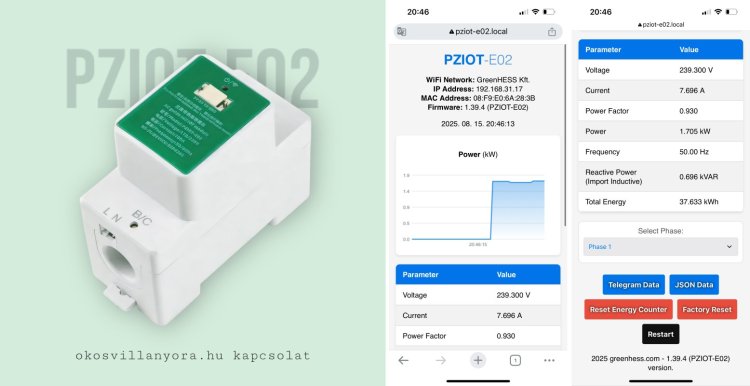
A fázismérés svájci bicskája
A PZIOT-E02 kétféle helyzetben adhat hatalmas segítséget:
1. Ha nincs P1 portos villanyórád
Ilyenkor a PZIOT-E02 önálló fázismérőként működik.
-
Egy fázison képes mérni a feszültséget, áramot, teljesítménytényezőt és a kumulált fogyasztást.
-
Az adatokat közvetlenül az hmke.app felhőbe juttatja MQTT-n keresztül, így a megszokott online felületen követheted a fogyasztásodat.
-
Ez az üzemmód különösen az 1 fázisú rendszereknél ideális, ahol a teljes háztartás fogyasztása egy fázison zajlik.
2. Ha van P1 portos villanyórád – de napelemes rendszered is van
Ebben az esetben az okosmérőből már megkapod a teljes hálózati adatokat, de nem látod az invertered pontos termelési adatait. A PZIOT-E02 ilyenkor az inverter mérésére használható:
-
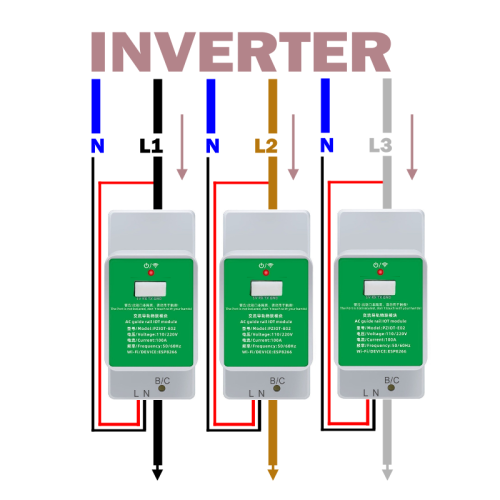
Úgy kell bekötni, hogy az inverterből érkező fázisvezetékre csatlakozzon, még az előtt, hogy azon bármilyen fogyasztó megjelenne.
-
Így az eszköz az inverter valós kimeneti feszültségét, áramát, teljesítményét és kumulált termelését mutatja – ami nem ugyanaz, mint a visszatáplálás adatai a mérőórából.
Telepítés és összekapcsolás az ADA P1 Meterrel
-
Telepítéskor a PZIOT-E02-t ugyanarra a Wi-Fi hálózatra kell csatlakoztatni, ahol az ADA P1 Meter is elérhető.
-
Az indulás után a saját IP-címén elérhető admin felületen egy lenyitható listából kiválaszthatod, melyik fázisra kötötted az eszközt (L1, L2 vagy L3).
-
Ez a beállítás nem csak egy egyszerű jelölés: ha megadod, a PZIOT-E02 automatikusan megtalálja a hálózaton az ADA P1 Metert, és az API végpontjára átadja a saját méréseit.
-
Az ADA P1 így a fogyasztásmérőből és a PZIOT-ból érkező adatokat együtt kezeli, és továbbítja az hmke.app felhőbe.
Így van két világos felhasználási szcenárió:
-
önálló fogyasztásmérőként (ha nincs P1 portod),
-
inverter-mérőként kiegészítésként (ha van P1 portod).
Telepítési útmutató + reset
Bekötés- PZIOT-E02 → a gyártói rajz szerint.
- Tápfesz, majd a PZEM mérőfejet a kívánt fázisra (L1/L2/L3). A fázist felülről vezesse lefelé.
- Célszerű a tápfeszhez külön kismegszakítót beépíteni, hogy az eszköz ki/be kapcsolható legyen.
- Első indítás / beállítás
- Áram alá helyezés után az eszköz saját Wi-Fi-t hotspot-ot hoz létre ADA-PZEM néven.
- Csatlakozz az AP-hoz, nyisd meg a beállító felületet aQR kóddal vagy a böngészőben a http://192.168.4.1 címen (setup).
- Add meg a Wi-Fi-t, (ha kell) MQTT-t, e-mailt/eszközjelszót.
- Ha van ADA P1 Meter eszköz a hálózaton az MQTT kapcsolatot ne engedélyezd!
- Mentés → újraindul, majd csatlakozik a saját hálózatodra (STA mód).
- Ekkor a webes felület a helyi IP-n érhető el.
Reset (gyári visszaállítás)
Az elején van egy süllyesztett nyomógomb. Nyomd meg egyszer, röviden, ekkor a készülék törli a beállításokat és AP módban indul újra a setuphoz.A PZIOT-E02 eszköz egy IOT eszköz. A firmware a reset gomb hosszú nyomásával törölhető. Ezért ne nyomd hosszan!
Beüzemelés → Önálló fázismérés (P1 port nélküli mérőknél):
1 fázisú rendszer:
- Kösd a PZEM szenzort az egy darab fázisra (L1).
- A PZIOT-E02 webes felületén állítsd a kiválasztott fázist (Select: L1).
- A helyi UI-n/JSON-on látni fogod a feszültséget, áramot, pillanatnyi teljesítményt és a kumulált energiát.
3 fázisú rendszer
- Válassz egy fázist mérésre (pl. L1) és arra kösd a PZEM-et.
- (Ha mindhárom fázist szeretnéd külön, ahhoz 3db PZIOT-E02 kell.)
- A webes felületen (http://pziot-e02.local) állítsd a fázis Select-et a bekötésnek megfelelően (L1/L2/L3).
- A készülék ezután folyamatosan méri és a helyi felületen/API-n szolgáltatja az adott fázis adatait.
Beüzemelés → ADA P1 Meterrel (okosvillanyora.local:8989):
Bekötés: a PZIOT az inverter fázisaira legyen bekötve még mielőtt bármilyen más fogyasztó csatlakozna.
Helyi hálózat: az ADA P1 Meter és a PZIOT-E02 legyen ugyanazon a WiFi-n(ellenkező esetben nem tudnak kommunikálni).
Fázis kijelölése a PZIOT-on: a webes felületen a Phase Select mezőben állítsd be, melyik fázist méri (L1/L2/L3).
Adatátadás: a PZIOT-E02 automatikusan átadja a fázis adatokat az ADA P1-nek (lokális HTTP-n, okosvillanyora.local:8989 címen) így nincs szükség külön előfizetésre.
Felhő: az ADA P1 ezeket a „plugins” adatokat beemeli és továbbküldi az hmke.app felhőbe – így a termelés/fázis-szintű mérések a megszokott dashboard-on is megjelennek. A HMKE.APP-ban automatikusan megjelenik a lakás fogyasztása és az inverter termelése.
PZIOT‑E02 ↔ ADA P1 Meter integráció
1) Rövid áttekintés
A PZIOT‑E02 egy ESP8266 alapú fázis‑mérő/monitor, ami Modbus‑on olvassa a PZEM modult, majd az adatokat:
- saját DSMR/OBIS jellegű „telegram” formában kiadja (HTTP végpont),
- opcionálisan MQTT‑re is publikálja,
- ha ADA P1 Meter-el használod a telepítéskor nem kell kipipálni az MQTT kapcsolatot!
- és HTTP POST kéréssel „plugins” eszközként átadja az ADA P1 Meternek a okosvillanyora.local:8989/write végpontra.
A cél: a P1 mérőn látható legyen az inverter/termelés (fázisonként), és ez bekerüljön az hmke.app felhőbe.
2) Fő komponensek
Mikrokontroller: ESP8266 (LittleFS, EEPROM, AP/STA üzemmód)
Szenzor / mérő: PZEM (Modbus)
Hálózat: Wi‑Fi (AP setup → STA), mDNS
Kommunikáció: HTTP (REST‑szerű lokális API), MQTT (retained), HTTP POST az ADA P1 felé
Firmware funkciók: OTA frissítés, gyári visszaállítás, távoli „task” futtatás
3) Üzemmódok
3.1 Access Point (AP) setup
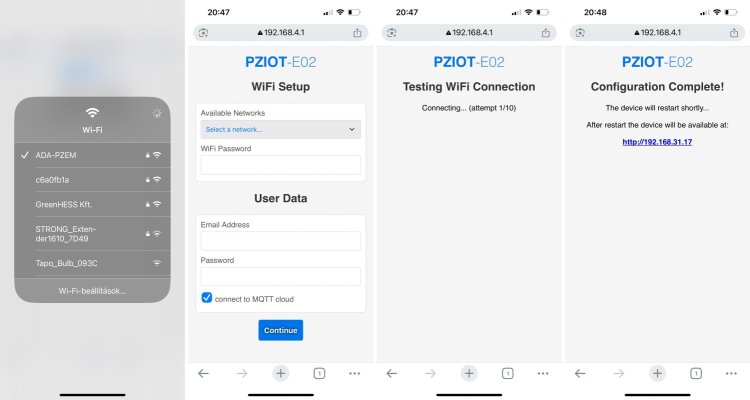
Eszköz SSID: ADA-PZEM (jelszó: 12345678)
Cél: Wi‑Fi adatok, e‑mail, eszközjelszó, fix hmke.app MQTT adatküldés.
Mentés után az eszköz STA módba lép és csatlakozik a hálózatra.
3.2 Station (STA)
Fut a lokális webserver és az API‑k.
PZEM lekérdezés → feldolgozás → JSON/telegram frissítés.
Időzített küldések: MQTT (ha beállított), illetve POST az ADA P1‑re.
4) Beállítási folyamat (first‑run)
Áram alá helyezés – az eszköz AP módban indul.
Csatlakozás az AP‑hoz (ADA-PZEM).
Setup oldal – SSID/jelszó, e‑mail, opcionális MQTT adatok beírása.
Mentés és újraindulás – az eszköz STA módban feljön, mDNS‑szel elérhető (pl. http://pziot-e02.local).
Fázis kiválasztása az admin oldalon (L1/L2/L3/–), EEPROM‑ba mentve.
5) Adatfolyam és időzítés
PZEM olvasás: ciklikus Modbus lekérdezések – feszültség [V], áram [A], PF, frekvencia [Hz], teljesítmény [kW], kumulált energia [kWh] (belső számláló).
Energia kumuláció: belső logika számolja a totalEnergy_kWh értéket (szűrt, időalapú integráció), manuálisan nullázható.
JSON frissítés: min. 10 s-ként új v2 JSON készül (helyi megjelenítés/MQTT).
ADA POST: fázisonként kiválasztott értékek HTTP POST‑tal mennek az ADA P1‑re.
6) PZEM olvasás (röviden)
Regiszterekből kiolvasott nyers értékekből számolt mezők:
Voltage (V), Current (A), Power (W → kW), Apparent power (VA), Reactive power (kVAR), Frequency (Hz), Power Factor (PF)
Hibakezelés: Modbus lekérdezések sikerességének ellenőrzése, részértékek frissítése csak siker esetén.
7) DSMR/OBIS telegram generálás
A PZIOT a mért adatokat OBIS kulcsokkal „telegram” sztringbe rendezi (pl. 1-0:32.7.0(V), 1-0:1.7.0(kW), 1-0:1.8.0(kWh), stb.).
CRC16 számítás a teljes telegramContent‑re, majd !XXXX formában a végére fűzi.
Lokális végpont: GET /api/telegram – tisztított, érvényes telegram vagy „No valid P1 telegram…”.
Megjegyzés: a kulcspárok és fordítások a forrásban karbantarthatók; lásd a mellékelt OBIS/language táblákat.
8) Lokális API végpontok (rövid lista)
GET / – admin UI (grafikon, beállítások)
GET /api/telegram – aktuális P1 jellegű telegram (CRC‑vel)
GET /api/json – aktuális JSON
GET /api/reset-energy?k= – kumulált energia beállítása (alapeset: 0)
GET /api/save-phase?phase=l1|l2|l3|- – kiválasztott fázis mentése EEPROM‑ba
POST /factoryreset – gyári visszaállítás
GET /restart – újraindulás (visszairányítás az IP‑re)
9) ADA P1 Meter integráció
Cél végpont: http://okosvillanyora.local:8989/write
Kérés törzs (példa):
{
"device": "plugins",
"values": [
{"index": 8, "name": "PZEM_total_l1", "value": 123.456, "unit": "kWh"},
{"index": 9, "name": "PZEM_voltage_l1", "value": 231.0, "unit": "V"},
{"index": 10, "name": "PZEM_power_l1", "value": 0.842, "unit": "kW"}
]
}
Index‑kiosztás fázisonként (bázis + mezők):
L1 → baseIndex = 7 → total = +1 → 8, voltage = +2 → 9, power(kW) = +3 → 10
L2 → baseIndex = 10 → 11, 12, 13
L3 → baseIndex = 13 → 14, 15, 16
A PZIOT minden küldés előtt frissíti a mérést (readPZEM()), majd a fenti struktúrában küldi az adatokat. A P1 ezeket „plugins” néven fogadja és beemeli a saját adatmodelljébe/felhőszinkronjába.
10) MQTT publikálás (opcionális)
Topic: dsmr/ (ahol az eszköz MAC‑ből képzett azonosító)
Payload: a v2 JSON.
Retained: igen.
Kapcsolat: a setup során megadott MQTT szerver/port/felhasználó/jelszó alapján.
11) OTA frissítés
Induláskor verzióellenőrzés: ha új firmware érhető el, HTTP update fut.
Hiba esetén nincs factory reset, a készülék megy tovább a régi fw‑vel.
12) Távoli „taskok”
Az eszköz időnként lekérdez egy felhasználóhoz kötött URL‑t.
Parancs példa: resetTotal → belső totalEnergy_kWh nullázása, majd visszajelzés.
13) EEPROM és gyári visszaállítás
Mentett adatok: Wi‑Fi SSID/jelszó, e‑mail, eszközjelszó, MQTT paraméterek, kiválasztott fázis.
Factory reset: HTTP‑n hívható; törli a konfigurációt, AP módba teszi a készüléket.
14) Biztonság, token, azonosítás
A v2 JSON tartalmazza a felhasználói/mezejazonosítókat, MD5 alapú token készül (MAC + e‑mail kombináció).
Lokális hálózaton történik a PZIOT → P1 kommunikáció.
15) Kapcsolódó fogalmak / kulcsok
OBIS kulcsok: 1-0:32.7.0 (feszültség), 1-0:31.7.0 (áram), 1-0:1.7.0 (pill. teljesítmény), 1-0:1.8.0 (összes aktív energia), 1-0:14.7.0 (frekvencia), stb.
Fordítások: HU/EN megnevezések (UI/JSON prezentációhoz).
17) Minták
17.1 /api/telegram (részlet)
/PZIOTE2A1B2C3…
1-0:32.7.0(231.000*V)
1-0:31.7.0(0.742*A)
1-0:1.7.0(0.842*kW)
1-0:1.8.0(123.456*kWh)
...
!ABCD
17.2 /api/json (v2, részlet)
{
  "username": "user@example.com",
  "wifi_ssid": "MyWiFi",
  "local_ip": "192.168.1.50",
  "mac_address": "AA:BB:CC:DD:EE:FF",
  "meter_serial_number": "PZIOTE2AABBCC",
  "voltage_l1": 231.0,
  "current_phase_l1": 0.742,
  "active_power_import": 0.842,
  "active_energy_import_total": 123.456,
  "frequency": 50.01,
  "power_factor": 0.98
}