
ADA-PN100 – P1 → S0 impulzusgenerátor
Az ADA-PN100 egy ESP32-alapú, okosmérők P1 portjáról olvasott OBIS adatokból S0 (számlálható) impulzusokat előállító eszköz. Célja, hogy a modern okosmérőkből kinyert energiaértékekből kompatibilis, impulzusjeleket adjon PLC-knek, mérőrendszereknek, adatgyűjtőknek vagy SCADA-knak.
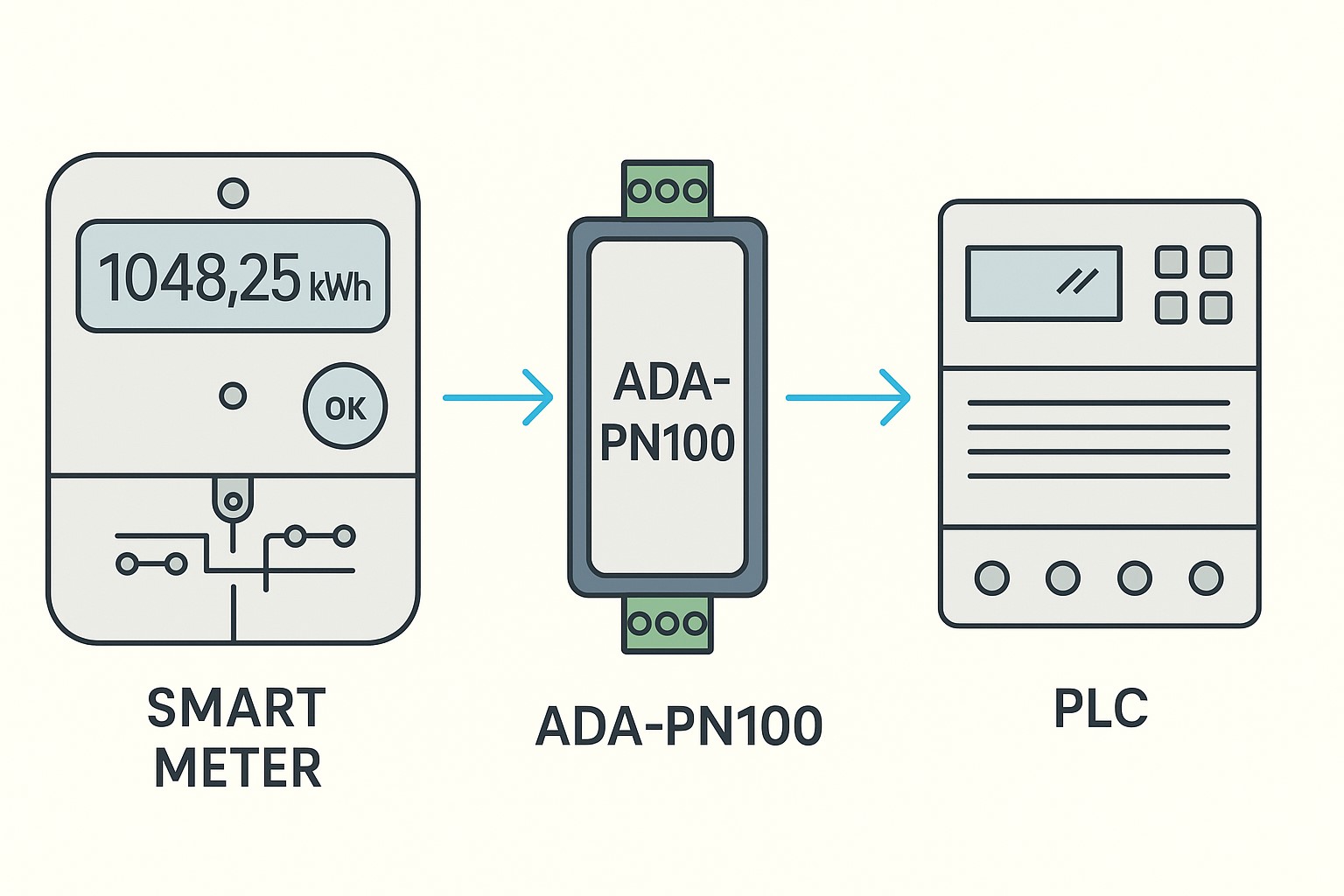
ms) és
mennyiségű (Wh/impulzus) S0-szerű impulzusok egy leválasztott,
potenciálfüggetlen PhotoMOS kimeneten (GAQY212GS).
Mire jó?
- Régi S0 számlálók/PLC bemenetek meghajtása okosmérős adatokból.
- Fogyasztás/termelés impulzus-kimenet (kWh alapú), kompatibilis ipari 24 VDC digitális bemenetekkel.
- PV-export/-import szétválasztott impulzus külön OBIS kódokkal (pl. vételezett:
1-0:1.8.0, betáplált:2-0:2.8.0). - Egyszerű integráció adatgyűjtőkhöz, loggerekhez, BMS/EMS/SCADA rendszerekhez, ha impulzust várnak.
Fő jellemzők
- OBIS alapú feldolgozás:
1-0:1.8.0(alapértelmezett, kWh), egyéb OBIS is megadható. - Konfigurálható impulzus hossza:
50–2000 ms(alap: 300 ms). - Konfigurálható
Wh/impulzus(pl. 100 Wh → 0,1 kWh/impulzus). - Stabilitás: EEPROM-mentett állapot (baseline + maradék kWh), áramszünet után sincs duplázás.
- Beépített naplózás: memóriagyűrű + LittleFS fájl (
/pn100.log), böngészőből nézhető. - Fizikai factory reset gomb (GPIO4): ≥5 s nyomás → gyári visszaállítás.
- Leválasztott kimenet: PhotoMOS SSR (GAQY212GS), potenciálfüggetlen, SPST-NO, 60 VAC/DC-ig, 500 mA-ig.
Hardver – kimeneti relé (GAQY212GS)
| Relé típusa | Szilárdtest félvezető relé (PhotoMOS), SPST-NO |
|---|---|
| Gyártói jelölés | GAQY212GS (SUPSIC), OptoMOS széria |
| Tokozás | SOP-4 (SMT) |
| Szigetelés | 1.5 kV (optikai leválasztás a kimeneten) |
| Kapcsolási idő | be: ~0.35 ms, ki: ~0.1 ms |
| Vezetési ellenállás | ~0.8 Ω (bekapcsolt állapotban) |
| Max. kimeneti áram | 500 mA |
| Max. feszültség | 60 VAC / 60 VDC |
| Vezérlő áram (LED oldalon) | max. 50 mA (tipikusan 5–10 mA elég) |
| Üzemi hőmérséklet | −40…+85 °C |
Megjegyzés: PhotoMOS relékben kis mértékű szivárgó áram természetes (µA nagyságrend). A szabványos PLC digitális bemeneteket ez tipikusan nem zavarja.
Figyelem: a kimenet legfeljebb 60 V AC/DC áramkörben használható. 230 VAC hálózatra soha ne kösd közvetlenül!
Kapcsolási logika (S0 / “száraz kontaktus”)
- A PhotoMOS kimenet nyugalomban nyitott (NO). Impulzus alatt zár → a 24 V-os PLC bemeneti kör rövid ideig záródik.
- A két kivezetés polarításfüggetlen (AC/DC-hez egyaránt alkalmas a 60 V határig).
- Tipikus bekötés: a PLC
+24V → bemenet → PN100 PhotoMOS → 0Vsorba kötve, vagy a PLC bemeneti S0+ / S0− kapcsokra közvetlenül.
Egyszerű bekötési példa (24 VDC PLC bemenethez)
+24V ──► PLC DI+ ──► [ GAQY212GS (PN100) ] ──► 0V (GND)
Webes beállítás (AP mód)
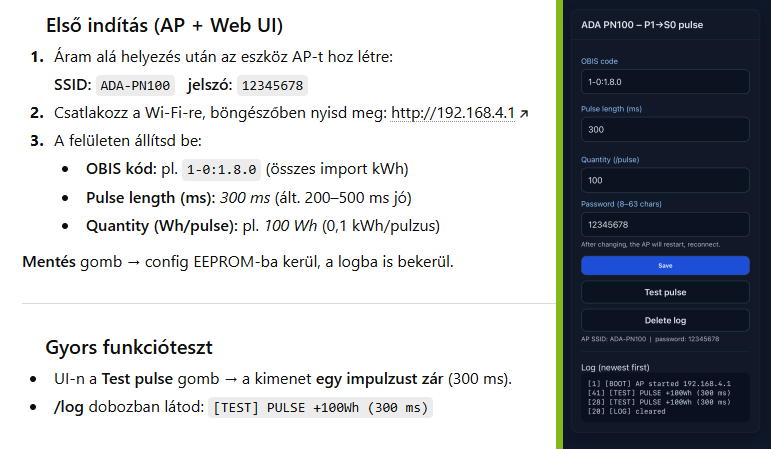
- Áram alá helyezés után az eszköz AP módba indul: SSID:
ADA-PN100, jelszó:12345678(módosítható). - Csatlakozz az AP-hoz, majd nyisd meg a böngészőben:
http://192.168.4.1. - Fő mezők a felületen:
- OBIS code – az olvasott OBIS azonosító (alap:
1-0:1.8.0). - Pulse length (ms) – impulzus időtartam (50–2000 ms; alap: 300 ms).
- Quantity (Wh/pulse) – mennyi Wh-onként adjon egy impulzust (pl. 100 Wh → 0,1 kWh).
- AP password – hozzáférési jelszó (8–63 karakter). Mentés után az AP automatikusan újraindul.
- OBIS code – az olvasott OBIS azonosító (alap:
- Save – beállítások mentése EEPROM-ba.
- Test pulse – próbaimpulzus (hardver és PLC bemenet gyors ellenőrzése).
- Delete log – napló törlése.
- Log – a legújabb bejegyzések felül, 5 mp-enként automatikus frissítéssel. Külön végpont:
/log?format=html|text&rev=1|0
Factory reset (fizikai gomb)
- GPIO4 lábon lévő gomb, INPUT_PULLUP mód.
- Ha ≥5 s ideig nyomva tartod → az eszköz minden beállítást töröl (OBIS, impulzus paraméterek, AP jelszó, log) és újraindul gyári értékekkel.
OBIS ötletek (nem csak az alap)
| OBIS | Jelentés | Tipikus felhasználás |
|---|---|---|
1-0:1.8.0 | Összes vételezett energia (kWh) | Fogyasztás számlálása (alapértelmezett) |
2-0:2.8.0 | Összes betáplált energia (kWh) | PV export impulzusok külön számlálóra |
1-0:1.7.0 | Pillanatnyi import teljesítmény (kW) | “Teljesítmény-arányos” impulzus (kW→Wh integrálás szükséges) |
2-0:2.7.0 | Pillanatnyi export teljesítmény (kW) | Exportfüggő impulzus sűrítés (pl. PV szabályozás) |
1-0:21.7.0/41.7.0/61.7.0 | L1/L2/L3 pillanatnyi import (kW) | Fázisonkénti impulzusok (három külön PN100-al) |
1-0:32.7.0 | Fázisfeszültség L1 (V) | Feszültségküszöb események számlálása (egyedi logika esetén) |
Az ADA-PN100 firmware alapvetően kWh-alapú impulzust ad, de tetszőleges OBIS olvasható. Ha nem kWh jellegű kódot adsz meg (pl. kW), akkor a mennyiségi helyesbítéshez (Wh/impulzus) célszerű az integrálás logikáját a firmware-ben bővíteni (projektfüggő).
Impulzus sűrűség megválasztása
A Wh/impulzus érték határozza meg, milyen sűrűn érkeznek az impulzusok. Példa:
- Terhelés: 3 kW (≈ 3000 W) → óránként 3000 Wh energia.
- Ha 100 Wh/impulzus, akkor 3000/100 = 30 impulzus/óra → átlagosan 2 percenként egy.
- Ha 10 Wh/impulzus, akkor 3000/10 = 300 impulzus/óra → átlagosan 12 mp-enként egy.
Általános PLC-knél a 30–300 ms impulzushossz biztosan számlálható. A firmware 50–2000 ms közötti tartományt enged.
Kompatibilitás (példák, nem teljes lista)
- PLC-k 24 VDC digitális bemenettel vagy dedikált S0 számláló bemenettel: Siemens LOGO!/S7 DI, WAGO, Omron, Schneider, FATEK, Unitronics stb.
- Adatgyűjtők / energiamonitorok, amelyek potenciálfüggetlen kontaktust várnak.
- SCADA rendszerekhez csatlakozó impulzus-számlálók.
Kulcs: a PN100 kimenete száraz kontaktust emulál (PhotoMOS), így széles körben illeszthető a 24 VDC ipari világhoz.
Rendszer architektúra (áttekintés)
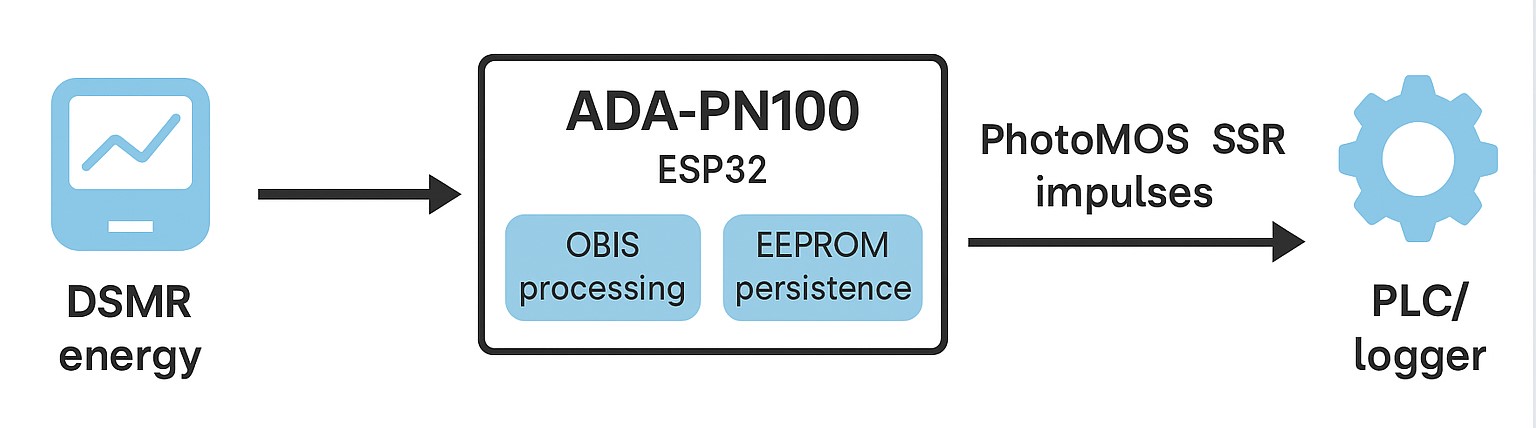
Okosmérő (P1, DSMR invertált 115200)  ──►  ADA-PN100 (ESP32)
                                           ├─ OBIS feldolgozás, EEPROM tartósítás
                                           ├─ Web UI (AP): /, /save, /test, /clear_log, /log
                                           └─ PhotoMOS SSR impulzusok  ──► PLC/Logger/SCADA (24 VDC bemenet)
Szoftver funkciók (web és API végpontok)
| Végpont | Leírás |
|---|---|
/ | Beállító felület (OBIS, pulse ms, Wh/pulse, AP jelszó) + élő log |
/save (POST) | Beállítások mentése EEPROM-ba (AP jelszó 8–63 karakter) |
/test | Egyszeri próbaimpulzus küldése |
/clear_log | Naplófájl törlése és RAM gyűrű ürítése |
/log?format=html|text&rev=1|0 | Log listázása (fordított sorrendben is) |
Telepítés és üzembe helyezés
- Hardver bekötése: PN100 PhotoMOS kimenetét sorba kötni a 24 V-os PLC bemeneti áramkörrel. Ügyelj a max. 60 V és 500 mA határra.
- Tápellátás: USB vagy 5 V VIN az ESP32 modulhoz (tipikusan < 200 mA).
- Webes beállítás: AP-hoz csatlakozás →
http://192.168.4.1→ mezők kitöltése → Save. - AP jelszó módosítás (opcionális): a mentés után az AP újraindul, csatlakozz az új jelszóval.
- Próba: Test pulse gomb → PLC számláló növekedését ellenőrizd.
Hibaelhárítás
- Nincs impulzus: Test pulse működik? Ha igen, a P1/OBIS feldolgozás lehet a gond (nem nő a kWh). Ellenőrizd az OBIS kódot és hogy valóban változik-e.
- A PLC nem számol: bemeneti típus megfelelő? 24 VDC DI vagy S0 számláló kell. Minimális impulzushossz legyen 30–50 ms felett.
- Szórványos téves impulzus: nagyon nagy impedanciájú bemenetnél ritkán érzékeny lehet a PhotoMOS szivárgásra. Tegyél gyenge lehúzót (pl. 10–47 kΩ) a bemenet és 0V közé.
- AP-hoz nem tudsz csatlakozni: tartsd nyomva a RESET gombot ≥5 s és indulj újra gyári jelszóval.
Biztonság és korlátok
- Max. 60 VAC/DC kimeneti feszültség! 230 VAC hálózatot ne kapcsolj.
- Az impulzus kimenet leválasztott PhotoMOS, potenciálfüggetlen, de ipari környezetben a zajok miatt figyelj a kábelezésre (árnyékolt vagy rövid vezeték, közös referencia a PLC-vel ha szükséges).
- A P1 porthoz a firmware invertált DSMR, 115200 8N1 beállítást használ.
Műszaki összefoglaló
| MCU | ESP32 (UART2: RX=16, TX=17, invertált) |
|---|---|
| Kimenet | GAQY212GS PhotoMOS, SPST-NO, 60 VAC/DC, 500 mA, ~0.8 Ω |
| Impulzus idő | 50–2000 ms (alap: 300 ms) |
| Skála | Wh/impulzus (felhasználó állítja; alap: 100 Wh) |
| OBIS | Alap: 1-0:1.8.0; egyéb megadható |
| Napló | RAM gyűrű 500 sor + LittleFS (/pn100.log), /log végpont |
| AP mód | SSID: ADA-PN100; jelszó szerkeszthető (8–63 karakter) |
| Factory reset | GPIO4 gomb ≥5 s → gyári állapot |
| Táp | 5 V (USB/VIN), tipikus < 200 mA |
Tippek a hardver meghajtáshoz
- Az SSR LED-jéhez 3.3 V-ról tipikusan 180–470 Ω soros ellenállás elegendő (8 mA esetén ~270 Ω számítható kiindulásnak).
- A PLC oldalon a bemeneti szűrést (debounce/impulzus-időzítés) érdemes 20–30 ms fölé állítani.
Beüzemelés
© GreenHESS / ADA-PN100 – technikai dokumentáció. A kompatibilitás felsorolása nem teljes körű, az egyes PLC-k bemeneti specifikációi eltérhetnek. A kimenet maximum 60 VAC/DC áramkörben használható.