
HMKE.APP – Az új generációs HMKE applikáció
A hmke.app a legújabb fejlesztésünk, amely kifejezetten a HMKE felhasználók igényeire szabva készült. Az hmke.app tapasztalataira építve hoztuk létre ezt a modern, mobilbarát HMKE applikációt, amely játékosabb és letisztultabb felhasználói élményt kínál. Nem váltja le a meglévő HMKE rendszert, hanem egy alternatív, kiegészítő megoldást ad, amely új szintre emeli az energiafogyasztás és termelés követését – különösen HMKE napelemes rendszert használók számára.
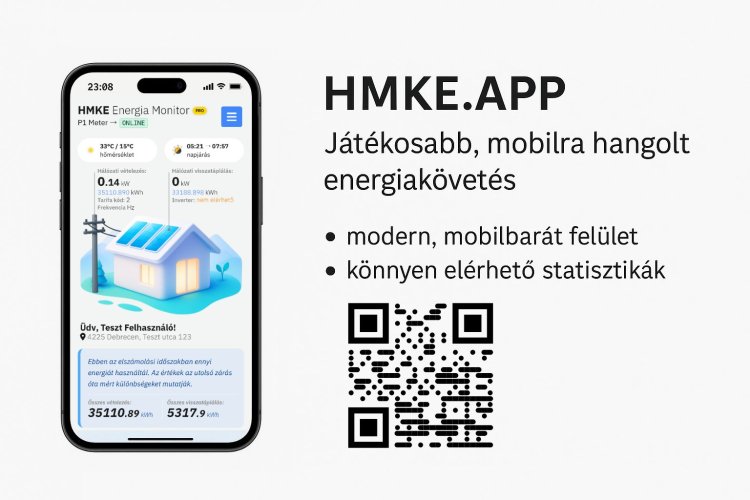
Egyszerű belépés a meglévő adatokkal
Ha már rendelkezel fiókkal az hmke.app oldalon, nincs szükség új regisztrációra.
Ugyanazzal
az e-mail címmel és jelszóval be tudsz lépni a hmke.app felületére, és
azonnal hozzáférsz az adataidhoz. Ne feledd a rendszer használatához
szükséged lesz valamelyik ADA P1 mérőhöz. További infókat erről az hmke.app weboldalon találsz.
Főbb funkciók a HMKE felhasználók számára
✅ Modern, PWA alapú HMKE applikáció
Nem kell keresni az
alkalmazásboltokban – a hmke.app oldalról közvetlenül telepíthető
mobilodra, és úgy működik, mint egy natív alkalmazás.
✅ Push értesítések a HMKE rendszer állapotáról
Azonnali
értesítést kapsz fázishibáról, szokatlan fogyasztásról vagy kiugró
termelésről – még akkor is, ha az app nincs megnyitva.
✅ Mobilra hangolt dashboard
Teljesen automatikus. Elemzi a
rendszeredet és egy testreszabott felületet kapsz azonnal attól függően,
hogy hány fázisod van és egyáltalán visszatáplálsz-e. Kifejezetten HMKE
napelemes rendszerek monitorozásához tervezve, de csak fogyasztók is
használhatják.
Átlátható statisztikák napi, heti, havi és éves bontásban, felesleges adathalmaz nélkül.
✅ Havi költségszámítás a HMKE rendszerben
Beállíthatod a havi fogyasztási limitet és a túllépés utáni árat – a rendszer automatikusan kalkulálja a várható költségeket.
✅ Automatikus napi jelentések PDF-ben
A Rendszerelemzés
menüponttal egyetlen gombnyomással letölthető napi/heti/havi riportot
készíthetsz a P1 Meter HMKE méréseiről, visszatáplálásról és
fázisadatokról.
✅ Teljes napi adatok előfizetés nélkül
A hmke.app ingyenes verziója is tartalmazza a teljes napi méréseket.
✅ Elszámolási időszak beállítása
Segít, hogy pontosan lásd az aktuális időszak energiafelhasználását és költségeit az általad meghatározott időszakban.
Hogyan kezdj neki?
- Nyisd meg a hmke.app oldalt mobilon, ne számítógépen.
- Lépj be a meglévő HMKE felhasználói fiókoddal, azzal az email és jelszó párosítással amit az ADA P1 mérőben megadtál.
- A Beállítások menüpontban add meg a fogyasztási limiteket, árakat, értesítéseket és elszámolási időszakot.
- Már indulhat is az energiaoptimalizálás – akár HMKE napelemes rendszer, akár más mérő van otthon.
A hmke.app jelenleg béta verzióban érhető el, folyamatosan fejlesztjük új funkciókkal, eszközökkel és integrációkkal, hogy a HMKE felhasználók a lehető legtöbbet hozhassák ki rendszerükből.
Próbáld ki most: hmke.app