
ADA P1 Meter integrations
One of the biggest advantages of the ADA P1 Meter is that it not only displays smart meter (DSMR/P1) data on its own interface but also easily forwards it to external systems. Thus it can be integrated into smart homes, automations, data collection, visualization, or even your own developed backend.
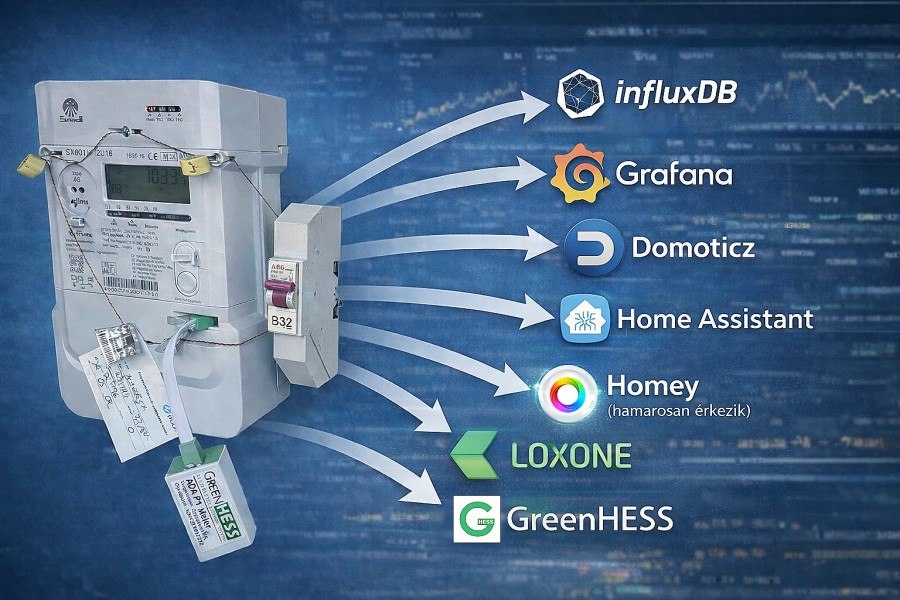
The two most important integration channels are:
JSON output (HTTP/REST): a queryable endpoint where measured and calculated values are accessible in a structured manner.
MQTT publishing: real-time data stream by connecting to a broker.
This makes it compatible with virtually any system that can process JSON or handle MQTT.
1) Home Assistant integration (HACS)
Our free integration is already available for Home Assistant under the name ADA Family.
GitHub: https://github.com/greenhess
Integration repo: https://github.com/greenhess/adap1meter
Installation via HACS
The integration can be installed through HACS usually in two ways:
If it appears in your HACS store, simply search for “ADA Family” or “ADA Family Meters” and install it.
If it does not appear by default, add it as a custom repository in HACS, then search and install it.
HACS custom repository addition guide: https://www.hacs.xyz/docs/faq/custom_repositories/
On the Home Assistant side, both REST and MQTT integrations are available, which most ADA-based setups rely on:
Home Assistant MQTT: https://www.home-assistant.io/integrations/mqtt/
Home Assistant REST sensors (documentation on HA site): https://www.home-assistant.io/docs/
2) JSON output: query it and do whatever you want with it
The JSON output is ideal if a system can request data over HTTP and extract fields from it. Typical uses include:
your own dashboard or backend
periodic polling from an external application
Home Assistant REST sensors
Node-RED / n8n / custom scripts (Python, PHP, JavaScript)
The advantage of JSON is that it is platform-independent: if the target system supports HTTP GET and JSON processing, then ADA P1 Meter can likely be connected immediately.
3) MQTT: real-time data stream for automations
If the goal is to receive values immediately (instead of polling), MQTT is the best way. The ADA P1 Meter connects to a broker (e.g., Mosquitto, EMQX) as an MQTT client and publishes to topics.
Why do many people like MQTT?
fast and lightweight
stable, ideal for distributed architectures
widely supported natively in many systems
Home Assistant MQTT: https://www.home-assistant.io/integrations/mqtt/
4) InfluxDB and Grafana: data collection and stunning visualization
If you want to collect data long-term and create impressive charts (daily/weekly/monthly trends, peaks, consumption profiles), one of the most popular setups is:
ADA P1 Meter → Home Assistant or intermediary logic → InfluxDB → Grafana
Home Assistant InfluxDB integration: https://www.home-assistant.io/integrations/influxdb/
InfluxData guide (Home Assistant + Grafana): https://www.influxdata.com/blog/how-integrate-gafana-home-assistant/
5) Node-RED: connect, transform, forward
Node-RED is a great choice if you want to use ADA data to:
transform it
merge from multiple sources
forward it to different systems
build more complex logic
Home Assistant Node-RED nodes:
6) Other systems where ADA easily feels at home
openHAB
MQTT binding documentation:
Domoticz
MQTT description:
Loxone
Loxone MQTT plugin description:
7) GreenHESS Cloud and apps: ready solutions for those who don’t want to deal with this
Integrations are great if someone wants to build, configure, and automate. However, many people prefer a ready-to-use solution.
This is what the GreenHESS cloud and its related applications are for, such as:
These platforms target those who don’t want to assemble Home Assistant, MQTT, databases, and dashboards but want a ready interface to track consumption, feed-in, production, and statistics.
Summary
Due to the open integration capabilities of the ADA P1 Meter, it can simultaneously be a DIY, developer-friendly device and a data source that fits nicely into the most popular smart home and visualization systems.
If you’re looking for a solution that can read JSON or handle MQTT, there is a good chance it can be quickly connected with ADA P1 Meter.
If you also have a working integration or a useful add-on, feel free to send it to us at info@greenhess.com and we will gladly feature it on the page!